


Janome MC500E

 is available on purchases between $10 and $2,000
learn more
is available on purchases between $10 and $2,000
learn more
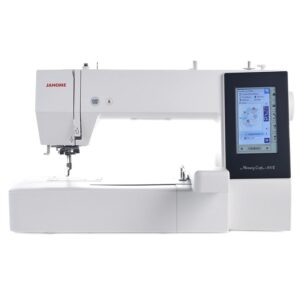
Create larger embroidery projects with the Janome MC500E. Explore its 200 × 280 mm stitch area, two included hoops, wide table and full accessory package.
$3,799.00 $5,999.00
Janome MC500E: give your embroidery more room
Personalise a jacket, stitch a quilt motif or add a name to a handmade gift. The Memory Craft 500E gives you a 200 × 280 mm embroidery area and two included hoops. Its wide table supports the hoop while you stitch.
Choose from 160 built-in designs and six embroidery fonts, or import compatible designs by USB. Arrange the design on the colour touchscreen before you begin. The MC500E handles embroidery; your regular sewing machine handles seams and garment construction.
Choose a hoop to suit the project
The RE28b hoop provides a 200 × 280 mm stitch area for larger designs. The square SQ20b gives you 200 × 200 mm. Both include templates to help position your fabric. The supplied wide table gives the larger hoop support.
Optional smaller hoops offer other project sizes. Choose designs that fit the selected hoop and leave space around the machine for the carriage to move freely.
Make names and motifs your own
Explore 160 built-in designs, six lettering fonts and two- or three-letter monograms. Combine lettering with a motif to create personalised gifts or decorative details for your home.
Move designs by drag and drop, duplicate them, rotate in 1° or 45° steps and flip them horizontally or vertically. Group elements, arrange lettering on an arc, use corner layouts and zoom in to check your arrangement.
Manage colour changes and progress
Use colour grouping for suitable combined designs to reduce repeated thread changes. Single-colour mode gives a different finish. The supported thread palettes include Janome, Robison-Anton, Madeira and Mettler.
See the stitch count and estimated stitching time on screen. Travel through a design in units of 1, 10 or 100 stitches, or jump directly to a chosen stitch point. The thread-break return function helps you resume after rethreading.
Prepare thread with less fuss
The superior needle threader works in one action. The Easy Set top-loading bobbin and bobbin-winder cutter simplify preparation. Automatic tension supplies a starting setting, with adjustment available for your materials.
Upper- and bobbin-thread sensors help monitor the thread supply. The automatic cutter trims the top and bobbin threads together. Programmable jump-thread trimming reduces finishing between sections.
Check placement before stitching
Adjust the hoop position and trace the outline to check where the design will stitch. Change embroidery speed from 400 to 860 stitches per minute to suit the work.
Five LEDs light the sewing area. The start/stop button controls stitching, while the lock key secures the machine for tasks such as threading and changing the needle.
Transfer and save your designs
Import compatible stitch files using a USB memory stick up to 16 GB, or use the supported PC connection. The machine has 3 MB of built-in memory and supports designs up to 200,000 stitches.
Embroidery Editor for Windows helps arrange embroidery designs on a compatible computer. Check Janome’s current software requirements before setting it up. Converting a picture or logo into embroidery requires suitable digitising software or a digitising service.
Included feet and accessories
- Embroidery foot P
- RE28b hoop with template, 200 × 280 mm
- SQ20b hoop with template, 200 × 200 mm
- Eight magnetic clamps and anti-slip hoop stickers
- Extra-wide embroidery table
- Five Janome bobbins, including the bobbin fitted in the machine
- Spare needle set
- Two large, two small and two special spool caps
- Additional spool pin
- Special high-tension embroidery bobbin holder
- Large screwdriver and flat needle-plate screwdriver key
- Lint brush and embroidery scissors
- Touch-panel stylus and bobbin-holder cleaner
- Soft machine cover
- USB cable and power cable
- Instruction book, instructional DVD and quick reference guide
- Embroidery Editor software and installation guide
RE20b, SQ14b and RE10b hoops are optional extras. The package above describes the original MC500E with its two standard hoops.
Key specifications
- Machine type
- Embroidery only; flat bed
- Maximum embroidery area
- 200 × 280 mm
- Included hoops
- RE28b and SQ20b
- Built-in designs / fonts
- 160 / six
- Embroidery speed
- 400–860 stitches per minute
- Maximum stitches per design
- 200,000
- Internal memory
- 3 MB
- Screen
- Full-colour LCD touchscreen
- Connections
- USB memory and PC connection
- Thread tension
- Automatic, with adjustment
- Lighting
- Five LEDs
- Machine size
- 566 mm wide × 335 mm high × 462 mm deep
- Machine weight
- 11 kg
- Wide table / cover
- Included / soft cover included
Frequently asked questions
Can the MC500E do ordinary sewing?
The MC500E stitches embroidery designs in a hoop. Use a separate sewing machine for seams, buttonholes and garment construction.
What is the largest design it can embroider?
The maximum embroidery area is 200 × 280 mm in the included RE28b hoop. Check the complete design size after adding lettering or combining motifs.
Which hoops and table are included?
The RE28b 200 × 280 mm hoop, SQ20b 200 × 200 mm hoop and wide table are included. The table supports the hoop during embroidery. Smaller optional hoops are available separately.
Do I need a computer to start embroidering?
No. Select and arrange the built-in designs on the touchscreen. A computer is useful for preparing downloaded designs and using separate embroidery software.
Can I use a Mac with this machine?
You can prepare compatible embroidery stitch files on a Mac using suitable software and transfer them by USB memory stick. The supplied Embroidery Editor is for Windows. Check the software’s requirements before purchasing a computer or program.
Can it embroider a business logo?
Yes, when the logo has been digitised into a compatible embroidery file within the machine’s limits. A picture file alone cannot be stitched. A digitising service can prepare the design for your size, fabric and thread.
Does it change thread colours automatically?
This is a single-needle machine. It stops between colour sections so you can change the thread. Colour grouping helps reduce repeated changes in suitable combined designs.
What supplies do I need?
Prepare embroidery thread, bobbin thread, fabric, stabiliser and an appropriate needle. Follow the instruction book when choosing a bobbin holder. Test the design on matching material before stitching your finished project.
What is the difference between the MC500E and MC550E?
The MC500E has a maximum embroidery area of 200 × 280 mm. The MC550E extends that to 200 × 360 mm and has a different built-in design collection. Compare the complete hoop package and the design sizes you plan to use.
Where can I find setup help?
The package includes the instruction book, quick reference guide and instructional DVD. You can also read the Australian MC500E brochure or ask our friendly team for help choosing supplies.
Bring your next embroidery project to life
Check the current price and availability, or ask our friendly team about your design size, fabrics and embroidery plans.
| Automatic Thread Cutter | Yes |
|---|---|
| Extra Wide Table | Included |
| Built In Designs | 160 |
| Machine Cover | Soft Cover |
| Bobbin Winder | Yes |
| Machine Ports | PC Port, USB Port |
| Sewing Speed | Up to 860SPM |
| Embroidery Format | JEF |
| Max Embroidery Area | 200mm x 280mm |
| Max. Stitches Per Design | 200,000 |
| Instruction Manual | Included |
| Instructional DVD | Included |
| Included Hoops | RE28b, SQ20b |
| Lighting | 5 White LED Lights |
| Machine Screen | Full colour LCD touchscreen |
| Stop/Start Button | Yes |
| Needle System | 15×1 / HAx1 (Standard), 15x1SP / HAx1SP (Ballpoint) |
| Needle Threader | Superior |
Based on 0 reviews
Only logged in customers who have purchased this product may leave a review.










There are no reviews yet.