

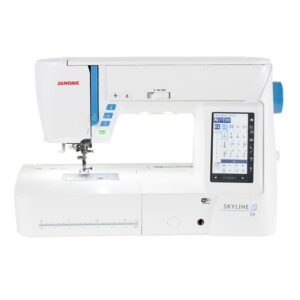
Janome Skyline S9
 is available on purchases between $10 and $2,000
learn more
is available on purchases between $10 and $2,000
learn more
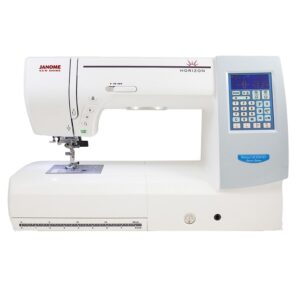
Sew, quilt and embroider with the Janome Skyline S9. Explore 250 embroidery designs, three included hoops, AcuFeed Flex and the full accessory package.
$4,899.00 $7,999.00
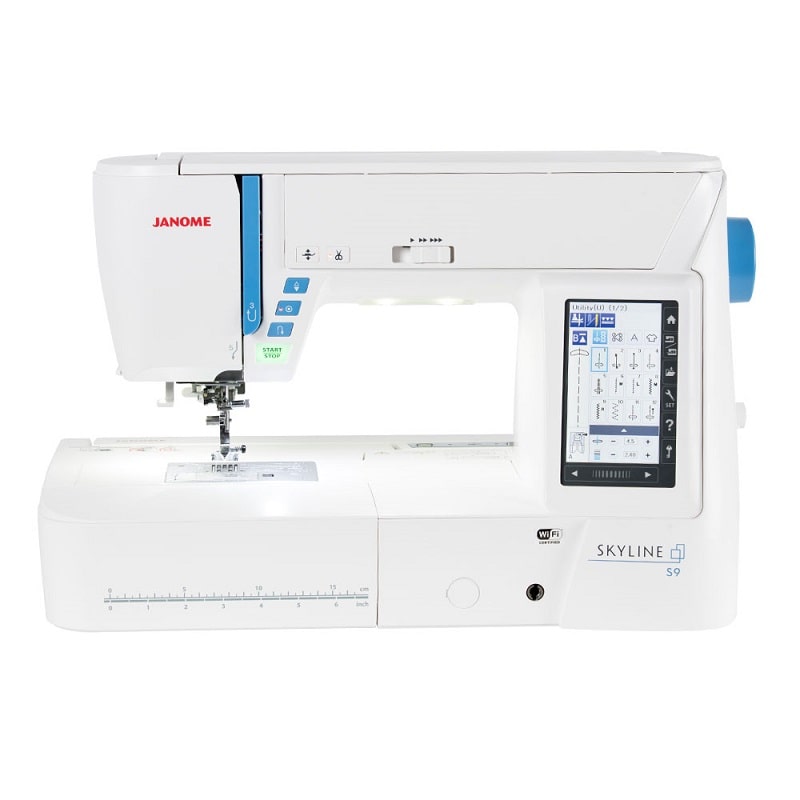
Janome Skyline S9: sewing, quilting and embroidery together
The Skyline S9 combines ordinary sewing with hoop embroidery. Explore 300 sewing stitches, eleven buttonhole styles and 250 embroidery designs, then arrange your settings on the colour touchscreen. AcuFeed Flex and automatic foot lift help with garment sewing and layered projects.
The package includes three embroidery hoops, twin and single AcuFeed holders, couching feet and a broad set of sewing accessories. Wireless, USB and compatible computer workflows let you bring additional embroidery designs to the machine.
Sew garments, patchwork and decorative details
Choose from 300 stitches and eleven one-step buttonhole styles. Stitch width adjusts up to 9 mm and length up to 5 mm. The colour touchscreen brings stitch selection, settings and sewing applications together.
Mirror eligible patterns, elongate selected satin stitches up to five times and use tapering for decorative endings. Save useful adjustments and combinations. Block, script and Broadway lettering add names or labels along a stitched line.
Control layers and changes of direction
AcuFeed Flex helps feed fabric layers from above and below. Both twin and single holders are included, with soles for general sewing, piecing and zips. Adjust the balance dial to suit your materials.
Automatic pressure and tension provide starting settings, with adjustment available. The automatic foot lift and pivot function help at corners. Memorised needle up/down, the knee lift and speed slider give further control, at sewing speeds up to 1,000 stitches per minute.
Embroider designs and lettering in a hoop
Choose from 250 built-in embroidery designs, including 40 Anna Maria Horner designs. The embroidery menu provides 20 monogramming fonts, with letter-size and layout options. Embroidery speed adjusts up to 800 stitches per minute.
Three hoops are included: RE20a at 170 × 200 mm, SQ14a at 140 × 140 mm and FA10a at 100 × 40 mm. The compact FA10a supports free-arm embroidery on suitable tubular items. Match each design to its selected hoop.
Arrange and check your design
On-screen editing lets you combine designs, move them by drag and drop, rotate, flip, resize and arrange lettering on an arc. Zoom and tracing help you check positioning before sewing. The design limit is 200,000 stitches, with up to 4 MB of internal memory.
Programmable jump-thread trimming and upper- and bobbin-thread sensors help manage the stitch-out. Travel through a design in steps of 1, 10, 100 or 500 stitches. Follow the manual to return after a thread break and adjust positioning when needed.
Transfer designs and edit on a compatible device
Transfer compatible designs through USB memory, a direct computer connection or the supported wireless workflow. AcuTools S includes Embroidery Editor, Stitch Composer for regular sewing stitches and a screen-saver tool. Full artwork-to-embroidery digitising requires suitable separate software.
AcuEdit supports wireless editing and transfer on compatible iPad and Android tablets. AcuMonitor supports monitoring from a compatible device. Check Janome’s current app requirements and S9 software support before choosing your setup.
Prepare thread and explore special techniques
The built-in needle threader, Easy Set bobbin and bobbin-winder cutter simplify preparation. A straight-stitch plate is supplied alongside the standard plate. Use the plate and needle position required for your selected stitch.
The package includes embroidery couching feet PC-1 and PC-2, plus yarn guides. Cutwork support requires the appropriate cutwork needles and setup. For free-motion quilting, lower the feed dogs and use the supplied quilting feet. Variable zigzag changes width through the knee lift.
Make room for everyday sewing
The sewing workspace gives you 210 mm to the right of the needle. Six LEDs illuminate the work area. Remove the accessory compartment for free-arm sewing, or attach the removable embroidery unit for hoop work.
Press the automatic cutter button to trim upper and bobbin threads together. Start/stop, reverse, lock-off and the safety lock help with everyday operation. The semi-hard cover and separate embroidery-unit case keep equipment protected between projects.
Included feet and accessories
- Zig Zag Foot (A Foot)
- Rolled Hem Foot (D Foot)
- Zipper Foot (E Foot)
- Satin Stitch Foot (F Foot)
- Open Toe Satin Stitch Foot (F2 Foot)
- Blind Hemming Foot (G Foot)
- Overedge Foot (M Foot)
- 1/4" Seam Foot (O Foot)
- Embroidery Foot (P Foot)
- Couching Foot Set PC-1 & PC-2 Feet
- Darning Foot (PD-H Foot)
- Automatic Buttonhole Foot (R Foot)
- Free Motion Quilting Closed Toe Foot (QC Foot)
- Button Sewing Foot (T Foot)
- Free Motion Quilting Open Toe Foot (QO Foot)
- Free Motion Quilting Zig Zag Toe Foot (QV Foot)
- Dual Feed Holder and Foot AD (Twin)
- Acufeed Open Toe Foot UD (Twin)
- Dual Feed Quilt Piecing Foot OD (Twin)
- Dual Feed Holder (Single)
- Dual Feed Foot VD (Single)
- Dual Feed Zipper Foot ED (Single)
- RE20a Hoop (6.7" x 7.9")
- SQ14a Hoop (5.5" x 5.5")
- FA10a Hoop (3.9" x 1.6")
- Instruction Manual
- Instructional DVD
- Buttonhole stabiliser plate and button-shank plate
- Yarn guide bar and yarn guide for couching
- Straight-stitch needle plate
- Five Janome bobbins, including one fitted in the machine
- Needle set and additional spool pin
- Two large, two small and two special spool holders
- Screwdriver, lint brush, seam ripper and quilting guide bar
- Embroidery scissors and touch-panel stylus
- Cloth guide and bobbin-holder cleaner
- Embroidery bobbin holder (yellow dot), with red-dot holder fitted
- Four magnetic clamps
- Felt, sample stabilisers and embroidery bobbin thread
- Large foot control and adjustable knee lift
- USB cable and power cable
- Key-icon reference charts
- AcuTools S software CD-ROM
- Semi-hard fabric cover
- Detachable embroidery unit with storage case
The extra-wide table, magnifiers and cutwork needles are optional extras. Check machine firmware before ordering optional HP equipment.
Key specifications
- Sewing stitches / buttonholes
- 300 / eleven styles
- Embroidery designs / monogram fonts
- 250 / 20
- Stitch width / length
- Up to 9 mm / 5 mm
- Maximum sewing / embroidery speed
- 1,000 / 800 stitches per minute
- Maximum embroidery area
- 170 × 200 mm
- Included hoops
- RE20a, SQ14a and FA10a
- Workspace to right of needle
- 210 mm
- Needle positions
- 91
- Memory / design limit
- Up to 4 MB / 200,000 stitches
- Lighting
- Six LEDs
- Machine size
- 508 mm wide × 316 mm high × 237 mm deep; 350 mm deep with embroidery unit
- Weight
- 11.9 kg machine; embroidery unit 3.4 kg
- Free-arm length
- 100 mm from the needle
Frequently asked questions
Can the S9 do regular sewing as well as embroidery?
Yes. Use the ordinary sewing mode for garments, patchwork and decorative sewing. Attach the embroidery unit and select embroidery mode for hoop designs. Each mode has its own feet and setup.
Which hoops are included?
RE20a provides 170 × 200 mm, SQ14a provides 140 × 140 mm and FA10a provides 100 × 40 mm. Templates are included. The largest embroidery area is 170 × 200 mm.
How many embroidery designs and fonts are built in?
The S9 has 250 embroidery designs, including 40 Anna Maria Horner designs. Its instruction book lists 20 embroidery monogramming fonts. These are separate from the lettering used in ordinary sewing mode.
Can I use designs from my computer?
Yes. Use compatible JEF, JEF+, JPX or DST files within the machine’s hoop and stitch limits. DST files do not contain thread-colour information. Transfer designs using the supported USB, computer or wireless workflow.
Do I need an iPad to embroider?
No. You can select built-in designs and use the machine touchscreen without an iPad. USB and compatible computer workflows offer other transfer options. Apps add editing or monitoring on supported devices.
Does AcuTools S create embroidery from any picture?
Embroidery Editor edits compatible embroidery files. Stitch Composer creates regular sewing stitches. Converting artwork into a finished embroidery design needs appropriate digitising software and preparation.
Can I embroider with yarn?
Yes. The included PC-1 and PC-2 couching feet and yarn guides support embroidery couching. Use suitable yarn and designs, and follow the couching setup in the instruction book.
Does it include both AcuFeed holders?
Yes. Twin and single holders are supplied, with AD, UD and OD twin soles and VD and ED single soles. Match the sole to its holder and the sewing technique.
Are HP accessories included?
No. The standard and straight-stitch plates are included. HP equipment is optional and needs the correct machine setup. Janome’s S9 firmware v2.10 adds HP needle-plate support; check the installed version before choosing those accessories.
Does the cutter trim both threads?
Yes. The automatic cutter trims the upper and bobbin threads together with suitable thread. Follow the manual for twin-needle sewing and specialised threads.
What should I prepare for a good embroidery result?
Choose the stabiliser, needle and thread for your fabric and design. Hoop the work securely, check the design position and make a sample stitch-out on matching material before embroidering the finished item.
Where can I find setup instructions?
The instruction book and instructional DVD are included in the original package. You can also read the Australian S9 brochure and use Janome’s model-specific software support page for updates.
Plan your next sewing and embroidery project
Check the current price and availability, or ask our friendly team about your projects, hoops and accessories.
Based on 0 reviews
Only logged in customers who have purchased this product may leave a review.










There are no reviews yet.