

MC15000QM

Out of stock
 is available on purchases between $10 and $2,000
learn more
is available on purchases between $10 and $2,000
learn more
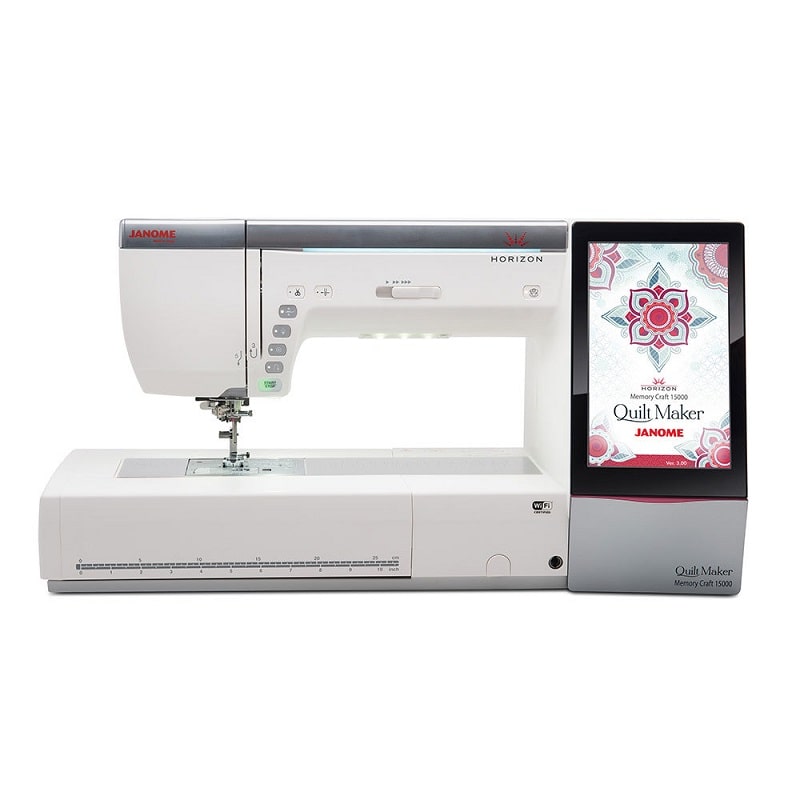
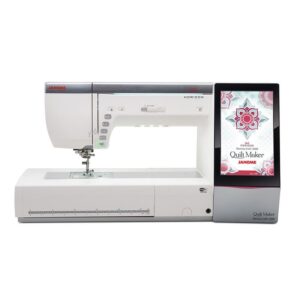
Explore the Janome MC15000 Quilt Maker, with sewing, quilting and embroidery, five included hoops, AcuFeed Flex and a complete accessory package.
$8,299.00 $14,999.00
Out of stock
Janome MC15000 Quilt Maker: sew, quilt and embroider in one place
Piece a quilt, sew a garment and add embroidery without changing machines. The Horizon Memory Craft 15000 Quilt Maker combines 510 sewing stitches with 480 embroidery designs and a maximum embroidery area of 230 × 300 mm.
The Quilt Maker package includes five embroidery hoops, a wide table, both AcuFeed holders and a substantial collection of feet. The HP foot and plate, ruler-work foot and free-motion feet give you several ways to approach your quilting.
Sew garments and add personal details
Choose from 510 stitches and 13 one-step buttonholes. Stitch width adjusts up to 9 mm and length up to 5 mm. Practical stitches, decorative patterns and lettering support garment sewing, patchwork and finishing details. The speed slider, start/stop, reverse and lock-stitch buttons keep everyday controls close at hand. Sewing applications and on-screen help support technique selection. A twin-needle setting helps you select suitable stitches and width.
Use the free arm for sleeves and other tubular pieces. The seven-piece feed system, automatic tension and adjustable foot settings help you prepare for different fabrics.
Choose your quilting approach
AcuFeed Flex helps feed layers from above and below. Twin and single holders are included, with soles for general sewing, piecing, open-toe work and zips. Match each sole to the correct holder.
The professional HP foot and plate support straight stitching and piecing. Lower the feed dogs for free-motion quilting, or use the QR ruler-work foot with suitable quilting rulers. Variable zigzag lets you vary the stitch width through the knee lifter. Tapering mode shapes the ends of eligible decorative stitches.
Make embroidery part of the project
The included GR hoop gives you a 230 × 300 mm embroidery area. Four further hoops support square projects, AcuFil quilting and smaller free-arm embroidery. Choose the hoop that fits the design and fabric.
Explore 480 built-in embroidery designs and eleven monogramming fonts, including Micro Gothic for small lettering. Two- and three-letter monograms offer another way to personalise your work.
Arrange and check your design
Use the nine-inch colour touchscreen to combine, duplicate, rotate, mirror, resize and move compatible designs. Arrange lettering on an arc, group elements and zoom in to check details.
Fine position and angle adjustments help you align the embroidery. Custom baste-and-trace functions help with preparation and placement. The lightbar shows embroidery progress. Cutwork techniques require suitable cutwork needles and the correct setup. Designs can contain up to 200,000 stitches, with up to 4 MB of internal memory. Adjust embroidery speed from 400 to 1,000 stitches per minute.
Keep preparation and finishing simple
The automatic needle threader, top-loading bobbin and independent bobbin-winding motor help with setup. Extra-high foot lift makes room when positioning thicker layers. Automatic foot lift and the adjustable knee lifter help you turn corners while keeping your hands on the fabric.
Press the cutter button to trim the upper and bobbin threads together, or use the supplied foot-control cutting switch. Programmable jump-thread trimming helps reduce finishing during embroidery. Travel through a design in units of 1, 10 or 100 stitches. Thread-break return helps you resume after rethreading.
See the work clearly
Ten white LEDs in five locations illuminate the sewing area. The retractable High Light gives additional light near the needle. Three included AcuView magnifiers offer 1.2×, 1.4× and 1.6× magnification for close detail.
The wide extension table supports larger projects. The cloth guide helps maintain an even seam allowance, while the semi-hard cover and separate embroidery-unit case protect the equipment between projects.
Transfer designs and create stitches
Transfer compatible JEF, JEF+ and JPX embroidery files by USB, the supported wireless workflow or a direct PC connection with Horizon Link Suite. The suite includes tools for editing embroidery, AcuFil quilting and creating regular sewing stitches with Stitch Composer.
Editing an embroidery file and digitising artwork are different tasks. A picture or logo needs suitable digitising software or a digitising service before it can be stitched.
Choose a device setup that suits you
The built-in screen handles everyday sewing and embroidery without a tablet. AcuEdit supports this Quilt Maker model for editing and wireless transfer on compatible iPad and Android tablets. Other supported apps offer placement or monitoring tools.
Check current app availability, operating-system requirements and machine software before planning a wireless setup. Horizon Link Suite uses its own software and update path. Check Janome’s current Windows requirements and model-specific support before setting it up.
Included feet and accessories
- Standard Zig Zag Foot (A Foot)
- Rolled Hem Foot (D Foot)
- Zipper Foot (E Foot)
- Satin Stitch Foot (F Foot)
- Open Toe Satin Stitch Foot (F2 Foot)
- Blind Hemming Foot (G Foot)
- Professional Grade Foot (HP Foot)
- Overedge Foot (M Foot)
- 1/4˝ Seam Foot (O Foot)
- 1/4˝ Seam Foot without a Guide (O Foot)
- Embroidery Foot (P Foot)
- Darning Foot (PD-H Foot)
- Open-toe Darning Foot (PD-H Foot)
- Free Motion Quilting Closed-toe Foot (QC Foot)
- Free Motion Quilting Open-toe Foot (QO Foot)
- Free Motion Quilting Zigzag Foot (QV Foot)
- Ruler Work Foot (QR Foot)
- Variable Zigzag Open-toe Foot (QZ Foot)
- Automatic Buttonhole Foot (R Foot)
- Stabilizer Plate for Buttonhole Foot
- Button Sewing Foot (T Foot)
- Concealed Zipper Foot (Z Foot)
- AcuFeed Holder (Twin)
- AcuFeed Foot AD (Twin)
- AcuFeed Open Toe Foot UD (Twin)
- AcuFeed Quilt Piecing Foot OD (Twin)
- AcuFeed Holder (Single)
- AcuFeed Foot VD (Single)
- AcuFeed Zipper Foot ED (Single)
- Straight Stitch Needle Plate
- Professional Grade Needle Plate HP
- 5 x Janome Plastic Bobbins
- Packet of Spare Needles
- Additional Spool Pin
- Spool Pin Felt
- Screwdriver
- Lint Brush
- Seam Ripper
- Quilting Guide Bar
- Spool Holder (large)
- Spool Holder (small)
- Thread Net
- Spool Stand
- Button Shank Plate
- Embroidery Scissors
- Touch Panel Stylus
- Cloth Guide
- Bobbin Holder Cleaner
- Embroidery Hoop GR (with template) 230x300mm
- Embroidery Hoop SQ23 (with template) 230x230mm
- Embroidery Hoop ASQ22 (with template) 220x220mm
- Embroidery Hoop SQ14 (with template) 140x140mm
- Embroidery Hoop FA10 (with template) 100x40mm
- 4 x Magnetic Clamps (for SQ23 and GR)
- 8 x Magnetic Clamps (for ASQ22)
- Bobbin Holder (Red Dot)
- Bobbin Holder (Yellow Dot)
- Felt Fabric
- Sample Stabilizers
- Bobbin Thread for Embroidery
- Extra Wide Table (Clear)
- Foot Control (with thread cutter switch)
- Adjustable Knee Lifter
- 3 x Optic Magnifiers (1.2x, 1.4x, 1.6x)
- Power Cable
- USB Cable
- Key Icon Reference Chart
- Horizon Link Suite CD-ROM (with installation guide)
- Semi-hard Fabric Machine Cover
- Detachable Embroidery Unit in own case
- Janome Branded Accessory Case
- Instruction Book
- Instructional Video DVD
Key specifications
- Machine functions
- Sewing, quilting and hoop embroidery
- Sewing stitches / buttonholes
- 510 / thirteen styles
- Embroidery designs / fonts
- 480 / eleven
- Maximum embroidery area
- 230 × 300 mm
- Included hoops
- GR, SQ23, ASQ22, SQ14 and FA10
- Maximum stitch width / length
- 9 mm / 5 mm
- Embroidery speed
- 400–1,000 stitches per minute
- Memory / design limit
- Up to 4 MB / 200,000 stitches
- Lighting
- Ten LEDs in five locations, plus retractable High Light
- Magnifiers
- 1.2×, 1.4× and 1.6×
Frequently asked questions
Does the Quilt Maker do ordinary sewing?
Yes. It sews seams, buttonholes and decorative stitches as well as embroidery. Remove the embroidery unit and set up the foot, needle plate and stitch for your sewing technique.
What is the largest embroidery area?
The GR hoop provides a maximum stitch area of 230 × 300 mm. Check the complete design size after adding lettering or combining patterns.
Which five hoops are included?
The package includes GR 230 × 300 mm, SQ23 230 × 230 mm, ASQ22 220 × 220 mm, SQ14 140 × 140 mm and FA10 100 × 40 mm hoops, with their templates.
What is AcuFil quilting?
AcuFil uses the embroidery system to stitch quilting designs. The included ASQ22 hoop and Horizon Link Suite tools support that workflow. It is a different technique from moving the fabric yourself during free-motion quilting.
Can I use quilting rulers?
Yes. The Quilt Maker includes the QR ruler-work foot. Use suitable machine-quilting rulers and follow the ruler-work setup in the instruction book.
Are both AcuFeed holders included?
Yes. Twin and single holders are supplied. Use the matching AD, UD and OD twin soles or VD and ED single soles for your technique.
Do I need an iPad to use the machine?
No. Select stitches and embroidery designs on the machine screen. A tablet is optional for supported app features. USB and compatible PC workflows provide other ways to transfer designs.
Can I embroider a logo from a picture?
The artwork must first be digitised into a compatible embroidery stitch file. Choose suitable digitising software or a digitising service, then test the result on matching fabric and stabiliser.
Does it change thread colours automatically?
The machine has one needle. It stops between colour sections so you can change the thread. On-screen editing and colour grouping can help organise suitable combined designs.
What supplies should I prepare?
Choose needles, sewing or embroidery thread, bobbin thread and stabiliser for your project. Follow the instruction book for the bobbin-holder setup. Make a sample before working on the finished item.
Plan your next sewing and embroidery project
Check the current price and availability, or ask our friendly team about your projects, hoop sizes and computer setup.
| Built In Stitches | 510 |
|---|---|
| AcuFeed | Yes |
| Adjustable Foot Pressure | Automatic Control |
| Bobbin Winder | Yes (Independent Motor) |
| Stop/Start Button | Yes |
| Accessory Box | Yes |
| Instruction Manual | Included |
| Instructional DVD | Included |
| Needle System | 15×1 / HAx1 (Standard), 15x1SP / HAx1SP (Ballpoint) |
| Needle Up/Down Function | Yes |
| Adjustable Stitch Width | Up to 9mm |
| Machine Cover | Semi-Hard Cover |
| Adjustable Stitch Length | Up to 5.00mm |
| Feed Dog System | 7 Piece Feed Dog |
| Magnifier | Included (1.2x, 1.4x, 1.6x) |
| Needle Positions | 91 |
| Pivot Function | Yes |
| Shank Type | High Shank |
| Stitch Selection | Screen |
Based on 0 reviews
Only logged in customers who have purchased this product may leave a review.









There are no reviews yet.